Browse bbdbuy Adidas: Build Workout Apparel Index in Sheets
Browse bbdbuy Adidas: Build Workout Apparel Index in Sheets
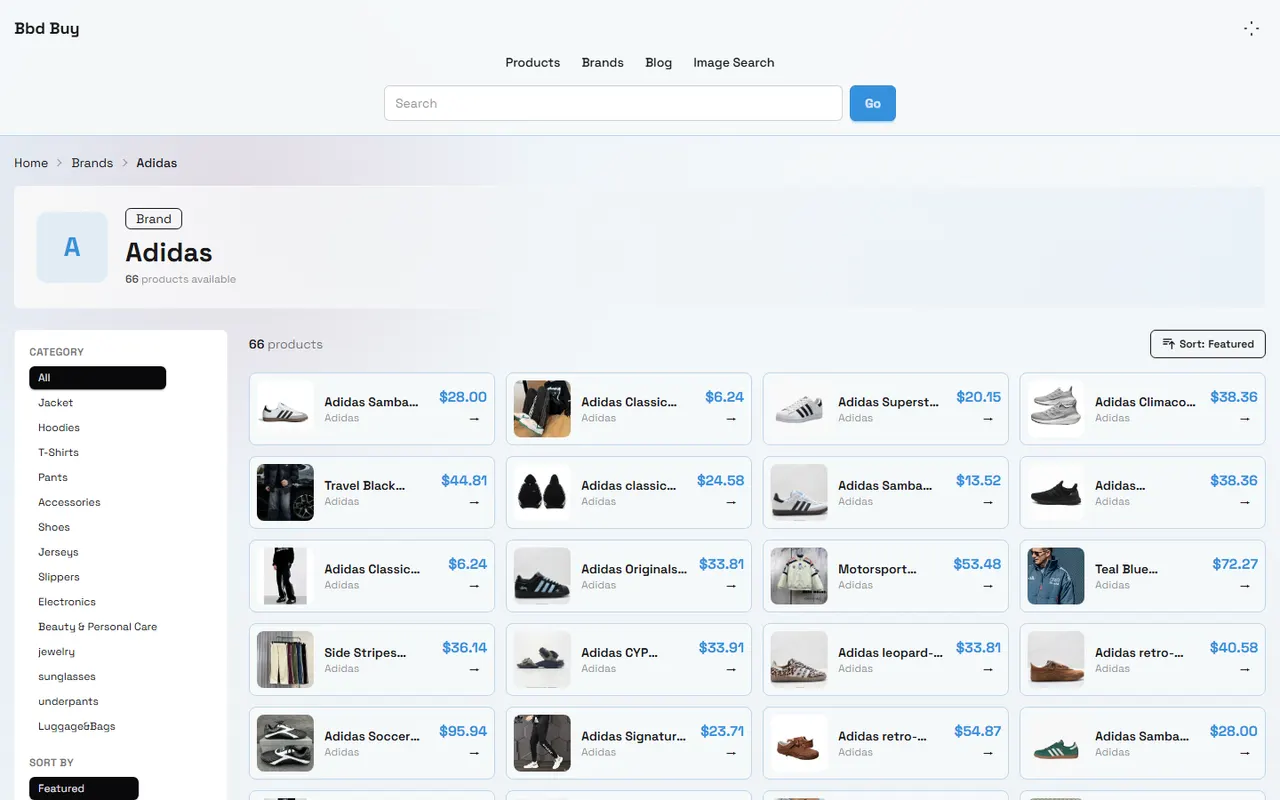
If you're browsing adidas products on bbd-buy.net, the most common problem isn't finding products; it's forgetting what you've seen after opening multiple pages: which shoes are suitable for daily wear, which pants are better for workouts, which links need another look, and when you saw the prices.
This article solves one specific task: organizing candidate products from the adidas brand page into a reviewable Google Sheets index to help you move from "seeing products" to "deciding whether to continue verifying." It's not a product recommendation list, and it doesn't imply that any product has completed authenticity, size, inventory, material, or after-sales verification.
bbd-buy.net publicly displays product names, brands, categories, prices, and sorting filters. The site also describes itself as a price comparison tool to help users find prices for Chinese products, not equivalent to a verified official adidas store or a complete page for purchasing, warehousing, inspection, consolidation, and after-sales services. Before ordering, still confirm the actual purchase path, seller information, destination country fees, and after-sales conditions separately.🔎
Clarify the Boundary Between Brand Browsing and Product Recommendations
Brand pages are suitable for discovery and initial screening, not for directly replacing purchase decisions.
When browsing, you can record the following visible information:
Product title
Brand shown on the page
Product category
Price and currency shown
Product link
Filter conditions and sorting methods on the page
Page recording time
This information only indicates what the page displayed at the time and cannot automatically prove:
The product is definitely produced or authorized by adidas
The image is exactly the same as the product you'll receive
The price includes international shipping, taxes, or platform service fees
A certain size is currently in stock
Colors, materials, fit, and size charts are accurate
The seller accepts returns or can handle after-sales issues
bbd-buy.net will handle warehouse inspection, consolidation, shipping, or customs clearance for you
Therefore, the purpose of the spreadsheet is to save candidates and evidence boundaries, not to label each product as "worth buying." Recommend at least three statuses: Candidate, To Verify, and Not Considering. This avoids mistaking a page view for a purchase recommendation.✅
How to Identify Candidate Products on the bbdbuy adidas Brand Page
According to the provided adidas brand page screenshot, the page shows about 66 products and offers categories such as Jacket, Hoodies, T-Shirts, Pants, Accessories, Shoes, Jerseys, Slippers, and sorting options like Featured, Newest, Price: Low to High, Price: High to Low, Most Popular. The screenshot also shows products divided into 3 pages, with 24 results per page.
These numbers and product prices are visible information at the time of capture and should not be taken as current inventory or prices. Before publishing or purchasing, reopen the page, record the new verification date, and confirm that the product cards still exist.
Browse in the following order:
Choose a specific category, such as Shoes or Pants.
Choose a sorting method, such as price low to high, to build an initial candidate pool.
After browsing the first page, record qualifying products; don't just save titles.
Continue checking subsequent pages to avoid mistaking the first page for the complete brand catalog.
Group same or similar titles, distinguishing colors, styles, and page links.
Open product detail pages to confirm that the product name, image, price, and visible specs still match the card.
Visible examples in the screenshot include Adidas Samba classic black and white sports shoes, Adidas Classic Track pants Black Relaxed Three for Daily Styling, Adidas Superstar Black and White Canvas Shoes, Adidas Climacool series grey sports shoes, etc. They serve only as examples of candidate records, not to infer current availability or confirm authenticity or official authorization.
How to Create Brand, Category, and Link Columns in Google Sheets
First, create a sheet called "Candidate Index." Each row records one product page; avoid putting multiple products in one cell.
Column Name | Content to Record | Purpose |
|---|---|---|
Record Status | Candidate, To Verify, Excluded, Decided | Distinguish discovery from decision |
Brand | Brand name shown on page | Filter by brand |
Product Title | Copy the full visible title | Avoid identifying only by abbreviation |
Category | Shoes, Pants, Jackets, etc. | Organize by clothing type |
Usage Scenario | Daily, Training, Workwear, Travel, etc. | Connect product to actual needs |
Page Price | Price and currency shown at the time | Save price evidence |
Product Link | Product detail page URL | Return to original page for verification |
Page Verification Date | Date when page was reviewed | Identify changes over time |
Color and Size | Only fill in what is explicitly shown | Avoid guessing from images |
Questions to Confirm | E.g., size chart, inventory, material | Specify next action |
Notes | Duplicate styles, suspected same style, or exclusion reasons | Preserve judgment basis |
Link column should store the product detail page, not just the brand page URL. The brand page helps you return to the catalog, but the detail page is the main entry for verifying name, specs, and price.
If the product link is long, set the display text to "Open product page" but keep the full URL. Don't replace links with untraceable abbreviations or copy only image addresses.
Use data validation to create dropdown options for "Record Status" and "Category," use filters to view a certain category, and freeze the first row. Simpler spreadsheets are more reliable for review.📋
Organize Candidates by Clothing Category and Usage Scenario
Category and usage scenario are not the same. The same pair of sweatpants may be suitable for daily styling but not for intense training; a shoe titled "sports shoes" doesn't mean the page has proven it's suitable for a specific sport.
Use "category plus scenario to be confirmed" format:
Shoes: Daily wear, training to be confirmed, travel to be confirmed
Pants: Daily wear, casual styling, sports to be confirmed
Jackets: Workwear, travel, outdoor to be confirmed
Hoodies: Daily, layering, warmth level to be confirmed
Jerseys: Jersey style, sports use to be confirmed
Accessories: Accessories or gear, need to verify size and material separately
If your goal is to buy a set of workout clothes, build a small candidate set rather than treating all 66 products as must-buys. For example, keep 3 shoes, 3 pants, 2 tops, and record one must-solve problem for each candidate: shoes need size chart confirmation, pants need fabric and length confirmation, jackets need thickness and season suitability confirmation.
This approach is more useful than sorting by price alone because final decisions usually depend on usage, size, color, budget, shipping, and return conditions. A low-priced product that doesn't fit the usage scenario is still not a valid candidate.
How to Cross-Check Website Product Cards and Spreadsheet Rows
After initial recording, do a "card to spreadsheet" check and then a "spreadsheet to detail page" check.
Card to spreadsheet check focuses on:
Is the title complete, without merging adjacent product text?
Is the brand from the current card, not guessed from the title?
Does the category match the current filter?
Is the price recorded with currency?
Does the product link point to the corresponding product, not the brand page or pagination URL?
Is the record date filled in?
Spreadsheet to detail page check focuses on:
Does the detail page title roughly match the card title?
Has the price changed?
Is the page still accessible?
Are there color, size, material, or inventory details?
Are there new sellers, purchase instructions, or after-sales restrictions?
Is the page blank, redirected, or unrecognizable?
If the card price differs from the detail page, don't arbitrarily take the lower one. Keep two columns: "Catalog Price" and "Detail Page Price," and set status to "To Verify." Price changes are facts to handle before purchasing.
If the same title appears on multiple pages, don't immediately judge it as a duplicate. Compare links, images, colors, categories, and visible specs; if unsure, keep both candidates and note "Similar title, not confirmed if same style" in the Notes.
Evidence Boundaries for Color, Size, and Update Time
Product titles are usually insufficient to prove complete specs. When titles contain Black, White, Grey, or similar color descriptions, only record the page text; don't infer actual color from screen display.
Similarly, words like Classic, Originals, Trainer, Functional in titles don't alone prove series affiliation, performance, or official identity. Record these words but write down what needs confirmation, such as:
Does the page provide specific color options?
Do different colors correspond to different product links?
Is there a size chart in centimeters or foot length?
Which product does the size chart apply to?
Does the page show inventory or just a buy button?
Is material information complete?
What is the last verification date for price and specs?
Update dates are especially important. Product counts, prices, sorting, and link status on brand pages may change. Use "Page Verification Date" instead of "Publish Date," and change status to "Needs Re-verification" after your review period.
If a product page does not show certain information, write "No page description" in the spreadsheet rather than "Unknown material" or "Should be in stock." Evidence gaps should not be filled by model memory, product titles, or other platform information.🧾
When to Stay on Website Browsing vs. Switch to Spreadsheet
If you're casually browsing styles, use the brand page's categories and sorting. Once you have more than a few candidate products, or need to compare categories, colors, sizes, and budget, moving to Google Sheets is more effective.
Suitable situations for spreadsheet:
You're comparing multiple shoes or clothing categories
You need to recheck prices and inventory over several days
You want to record multiple product detail pages
You need to share screening with family or team
You want to distinguish "Liked," "To Verify," and "Excluded"
You're preparing to check shipping, taxes, after-sales, or purchase path
Situations not suitable to rely solely on spreadsheet:
You haven't opened the product detail page yet
Key specs exist only in images and are illegible
You need to confirm actual material, workmanship, or fit
You need to confirm seller qualifications, authorization, or authenticity
You're ready to order but haven't confirmed destination fees and after-sales conditions
The spreadsheet is for saving comparison process; the website provides current page evidence. They cannot replace each other. After building the index, return to specific product pages for final verification.
Action Checklist After Completing the adidas Candidate Index
After organizing, proceed in this order:
Delete obviously duplicate or inaccessible product rows
Fill in detail page links for each retained product
Record page price, currency, and verification date
Mark colors, sizes, materials without clear evidence as "To Confirm"
Filter a small candidate set by category and usage scenario
Write down one specific next-step question for each candidate
Check if the actual purchase path is clear
Separately confirm international shipping, taxes, customs responsibility, and after-sales conditions
Reopen pages before ordering to confirm price and page status
Finally, divide candidates into three groups:
Keep: Page accessible, basic purpose clear, few next-step verification issues
To Verify: Product attractive but size, inventory, material, seller, or purchase process unclear
Excluded: Broken link, insufficient info, unsuitable purpose, or total cost over budget
Don't skip size, inventory, shipping, tax, and after-sales verification just because the page price seems low. This index saves time on repeated browsing and comparison but cannot eliminate risks of product info changes, poor fit, page failures, or cross-border purchase risks.
If your goal is just discovering adidas-style products, website browsing is enough; if you need to decide among multiple categories and candidates, Google Sheets is better. Only after independently verifying candidate info, purchase path, and total cost should you move to purchase judgment.
Agent Platform Shopping FAQs
1. What should first-time users pay attention to on bbd-buy.net?
New customers accessing the Taobao agent through bbd-buy.net's spreadsheet for the first time generally receive a welcome shipping discount package. Also, you should review the step-by-step shopping tutorial for beginners available on bbd-buy.net.
2. Why doesn't bbd-buy.net use Google Sheets?
Google Sheets works only for spreadsheets containing a small number of items. As the product count grows, loading slows down and the system lags noticeably, especially on mobile devices where visuals degrade and searching becomes awkward. For identical product lists, bbd-buy.net's spreadsheet loads quicker and presents a more polished visual design.
3. How can I search for products I want to buy on bbd-buy.net?
You may search with a single keyword or proceed straight to the category page, where items are also sorted by brand. Longer queries tend to yield fewer matches than shorter ones, though they are more targeted. For instance, you could look up "Air Force 1 White," "sneakers," or just "Air Force 1."
Browse our latest products and find your next favorite item.