How to Use bbdbuy Mobile Filters and Keep Candidates
How to Use bbdbuy Mobile Filters and Keep Candidates
How to Use bbdbuy Mobile Filters and Keep Candidates
When browsing Chinese products on your phone, the real challenge is usually not finding a keyword, but keeping the products worth further verification from a large pool of candidates. Filtering, zooming, scrolling, and going back each solve different problems: filtering narrows the range, zooming makes controls and product info visible, scrolling helps discover complete results, and going back determines whether the candidate clues you left are still there.
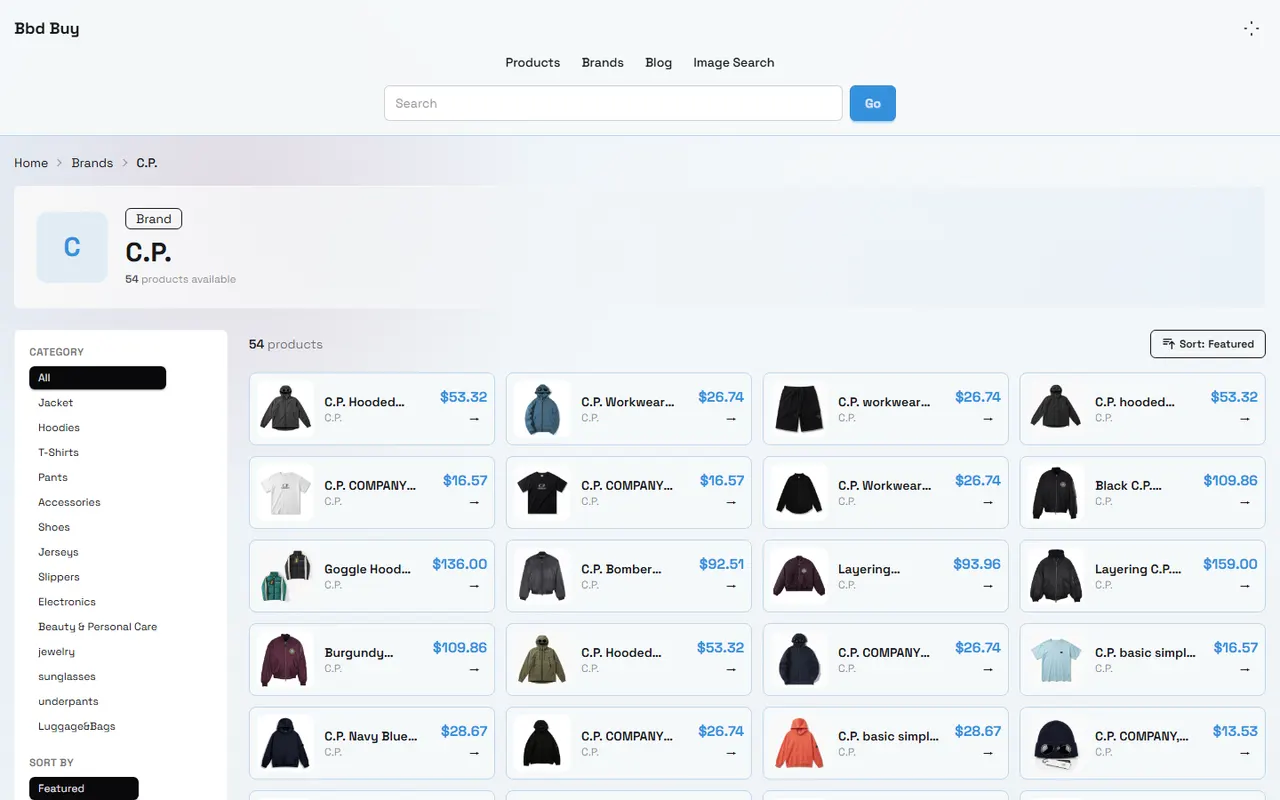
This article focuses on one task: using bbdbuy's category page and sorting filter controls to organize candidate products for further verification on mobile. The facts about the page structure are verified against the C.P. brand category page on bbd-buy.net, with a verification date of October 7, 2026. The page shows elements such as category, sorting, price range, reset filters, pagination, and result count; the actual layout on mobile browsers may vary due to screen size, browser, and page updates.
Define the Candidate Search Task for Mobile Filtering
Before you start, write your task as an actionable sentence, for example:
"I want to find 3 to 5 candidates from a product category on bbdbuy, with a suitable price range and clear style direction, that I can open detail pages for later verification."
This goal has three boundaries:
Filter results are only candidates, not proof of stock, quality, authenticity, or final purchasability.
The displayed product price alone cannot represent the total cost; you still need to verify shipping, service fees, taxes, sizes, and return/exchange terms.
If the page cannot open details, the product name is unclear, or key images are missing, you cannot make a purchase decision based solely on the list card.
What doesn't apply: needing real-time stock confirmation, accurate shipping quotes, material authenticity checks, or comparing customs rules for different destination countries. Filters only help you narrow the range; they cannot replace these verification steps.
What Filtering, Zooming, and Scrolling Do on bbdbuy Pages
Based on the verified category page, the page provides filtering or sorting entry points such as Category, Sort By, Price, and Reset Filters, and displays the current result count and pagination. The page also shows product name, brand, and price on product cards. On mobile, you can think of these controls as four different tools:
Category filter: Excludes irrelevant products, for example switching between categories like Jacket, Hoodies, T-Shirts, Shoes.
Sorting: Changes the order candidates appear, for example viewing by Featured, Newest, Price: Low to High, Price: High to Low, or Most Popular.
Zooming: Solves problems with buttons being too small, text being cut off, or filter menus being hard to tap. Zooming only changes the display scale; it does not mean the filter conditions have changed.
Scrolling and pagination: Checks whether there are still candidates on the current page and moves to the next page. Only looking at the first few product cards that appear on the phone screen cannot prove that the results have been fully browsed.
When using zoom, prioritize making the filter controls, product names, and prices readable at the same time. Zooming in too much may cut off horizontal content, and zooming out too much can cause accidental taps on adjacent options. After each zoom change, reconfirm the currently selected category and sorting text.
Operating Order: From Keywords, Categories to Candidate Results
It's recommended to operate in the following order:
Clarify the product direction first. Don't enter a broad target directly; instead, determine the category, style, or use, such as "lightweight jacket" or "black hoodie".
Enter the relevant category. Prioritize using the category entry provided by the page to reduce mixing different product types in comparison.
Set the sorting method. Use Newest when you need to discover new items, or Price: Low to High when you want to see low-price candidates first; sorting is just browsing order, not a quality ranking.
Record the first candidates you see. Don't open many pages right away; first note the product name, displayed price, page number, and reason for selection.
Scroll to the bottom of the current page. Confirm whether there are more products, result count, and pagination entry.
After going to the next page, continue recording candidates; don't assume the filter state from the previous page is the same on the next page.
Select a few candidates, then open their detail pages one by one to verify images, specifications, seller info, available options, and page status.
The verified category page once showed 54 products, 24 results per page, and 3 pages of browsing. This number is the page state on the verification date and cannot be regarded as a long-term fixed rule. After page updates, rely on the current page's displayed count and pagination.
Action | Page signals to confirm | Conclusions you cannot directly draw |
|---|---|---|
Select category | Current category name or highlighted state | That category contains all relevant products |
Select sorting | Current text in the sorting menu | Items at the front are necessarily more worth buying |
Scroll and paginate | Result count, page number, next page entry | You have seen all available products |
Record price | Displayed amount on product card | Final total price or final discount |
How to Check If Filter Conditions Are Still Valid After Going Back
When you go back on mobile, the browser may retain the scroll position or reload the page. Don't judge that the filters are still valid just because "the page looks similar"; check in the following order:
Look at the category entry to confirm it's still the category you selected.
Look at the sorting control to confirm it hasn't reset to default sorting.
Check whether the filter conditions are still shown in controls, labels, or page results.
Compare the result count. If the count suddenly changes, record the change first, then judge whether it's due to filter invalidation, page update, or incomplete network loading.
Check whether the first few items in the product list are the same as before you left. Completely different names and order mean you cannot directly rely on your previous judgment.
If the page returns to the top, scroll back to your last recorded position to avoid mistaking an unviewed area for having no products.
If there is no obvious filter state indicator, treat the page after going back as a new page state and reconfirm category, sorting, result count, and candidate names. This takes a little more time, but it's safer than treating invalid filters as valid.🔎
Use a Table to Record Products to Keep, Exclude, or Verify
The most common problem on mobile is forgetting why you kept a product after opening too many tabs. It's recommended to record only the information that supports your next action:
Product name | Displayed price on page | Status | Reason for keeping or excluding | Next step |
|---|---|---|---|---|
Name actually displayed on page | Amount seen on verification date | Keep, exclude, or to verify | Category match, price mismatch, or insufficient info | Open details, re-filter, or give up |
"Keep" means it's worth opening the detail page, not that it's confirmed buyable. "To verify" applies to products with incomplete name, price, or page status. "Exclude" should have a reason written, such as category mismatch, price over budget, duplicate candidate, or detail page inaccessible.
Don't save only a product name. At least save the category, sorting method, page number, and verification date. If results change after page reload, these records can help you judge whether the candidate was affected by filter conditions or the page content itself changed.
Which Page States Cannot Prove Complete Filter Results
The following states alone cannot prove you have obtained a complete set of candidates:
The page shows a result count, but you haven't viewed all pagination.
The sorting name shows Most Popular, so you treat the first few items as the most suitable for you.
No results in a price range, so you conclude the platform has no related products.
The phone page only loads some cards, so you treat blank areas as the end of results.
You can still see products after going back, so you assume filter conditions haven't changed.
A product card has a price, so you assume the price includes international shipping, taxes, or after-sales costs.
Result completeness requires judgment based on at least category, sorting, pagination, result count, and page loading status. If these signals contradict each other, mark as to verify rather than guessing missing results.⚠️
Troubleshooting Checklist for Mobile Filter Failure or Display Anomalies
Troubleshoot in order from simple to complex:
Check network stability and wait for product cards and result count to finish loading.
Restore page zoom to an easy-to-operate scale, and confirm whether any controls are blocked or cut off.
Reopen the filter menu and confirm the selection was actually applied, not just expanded.
Check if you accidentally tapped Reset Filters.
Record current category, sorting, and result count, then reload the page for comparison.
After returning to the list page, don't rely on scroll position; reconfirm filter status.
If result count, sorting text, and product list are inconsistent, hold off saving candidates and verify after the page stabilizes.
If still unable to judge, use a different browser display scale to recheck, and keep the time and page state of the anomaly.
Don't keep clicking filter buttons or resubmitting the same action just because filter results suddenly decrease. Repeated clicking may lose your original page state and increase misjudgment.
Candidate Verification and Next Steps After Filtering
After filtering, keep only 3 to 5 candidates that really need comparison. Open each detail page one by one and at least check:
Whether the product name matches the list card;
Whether product images, colors, sizes, or specifications are sufficient to support selection;
Whether the price corresponds to the current option, not some minimum configuration;
Whether the page is still accessible, with no empty page, redirect, or obvious missing;
Whether the seller, platform source, and purchase path are clear;
Whether international shipping, taxes, warehousing inspection, consolidation, and return/exchange terms need separate confirmation.
After completion, divide candidates into three groups: "can continue verification", "need supplemental information", and "excluded". Don't treat filter results as a purchase list, and don't make final decisions based solely on price sorting. For products you plan to order, complete size, stock, cost, logistics, and after-sales checks.
This method is most suitable for users who need to quickly organize multiple product candidates on their phone but still plan to verify details. It's not suitable for treating the list page as a real-time inventory system, or using sorting results as proof of quality, authenticity, and final cost. Final judgment should be based on the specific pages accessible on the verification date and applicable destination country conditions.✅
Agent Platform Shopping FAQ
1. How should I understand the QC photos on bbd-buy.net?
Platforms like bbd-buy.net have dedicated quality inspection teams. After goods arrive at bbd-buy.net's warehouse, the platform will inspect the products and take QC photos, usually three, to check whether the color, size, specifications, and quantity match the order, and also check for quality issues, but for electronics only the appearance is checked. If quality issues or size/color errors are found, the team will immediately request a return from the seller, thereby ensuring you receive good quality products.
2. Is the spreadsheet website of bbd-buy.net safe?
The website does not collect any personal information, and is only used as a product catalog for the agent platform bbd-buy.net. All transactions are completed on the bbd-buy.net agent platform.
Browse our latest products and find your next favorite item.